
Cloud Streaming Live Production One BeStream Platform.
Host multi-guest live events, manage relay destinations, offer Ad Insertion and 24/7 Cloud Playout, record to the cloud and deliver professional streams from one BeStream platform.
Multiple sources in. Every destination out.
Connect multiple SRT and RTMP inputs, switch your cloud program, record and run 24/7 playout. Relay to YouTube, Instagram, Kick and any custom RTMP server.
Send your live feeds
Choose OBS Studio or vMix, set SRT or RTMP, and switch sources live.
One stream. Any destination.
Relay one live channel to social platforms, embed a player, or define your own RTMP destination.
Click a platform to turn its relay on or off in this demo.
OBS sends the live feed over SRT. Select RTMP to see the alternative, or choose vMix to switch sources.
Modern control for relay, recording and multi-destination output.
BeStream Studio is the modern channel view for RTMP/SRT encoder details, destination relay settings, server-side recording and VOD library access — without showing customer-specific stream names on the public site.
Built for live operations across industries
The same infrastructure, configured differently. Pick the workflow closest to yours.
Match-day feeds, multi-camera venues, tight rights windows.
Sports & Live Events
Stadium and arena feeds arrive over SRT from the venue and go straight out to rights-holder platforms, an OTT front end, or both at once. Signed URLs and geo-aware delivery keep the stream where the rights allow it.
- SRT contribution from the venue over the public internet
- Simultaneous relay to rights-holder platforms and your own player
- Signed URLs so a match feed cannot be hot-linked
- Server-side recording for highlights and post-match VOD
Channel origination, backhaul and playout support.
Broadcasters & Media
Take feeds in from studio, field or headend and deliver them as HLS to viewers, with UDP multicast available for internal distribution. IP MULTICODER covers H.264/H.265 encoding, SRT/UDP decoding and protocol gateway workflows when dedicated hardware is not on site.
- RTMP and SRT ingest with listener and caller modes
- UDP unicast and multicast for headend integration
- Primary and backup publishing paths on every channel
- Full VOD library for catch-up and archive
All-hands meetings, investor calls, internal comms.
Corporate & Enterprise
Run a town hall from the browser with BeStream Live Event, bring in remote executives as guests, and publish to an internal audience with access control rather than a public platform.
- Browser-based production room, up to four guests
- Token-protected playback for internal-only audiences
- Branded player and scenes with your own logo
- Cloud recording so the session is available afterwards
Weekly services, streamed reliably with a small team.
Houses of Worship
One encoder in the hall feeds the service to YouTube and Facebook at the same time, while a recording lands in the VOD library for the congregation to watch later in the week.
- One source, several destinations, no extra hardware
- Runs unattended once configured for weekly services
- Cloud recording for members who could not attend
- Ad-free player when you host the stream yourself
Client events, conferences, hybrid production.
Event Production & Agencies
Manage several client channels from one panel, hand encoder details to whichever crew is on site, and switch destinations per event without rebuilding the workflow each time.
- Multiple channels under one account
- Encoder details you can hand to any on-site crew
- Per-event destination routing from the same screen
- White-label player without third-party advertising
Lectures, ceremonies, remote teaching.
Education & Training
Stream a lecture hall or a graduation ceremony live and keep the recording as a VOD asset, with access control so material stays inside the institution when it needs to.
- Live lecture delivery over HLS to any device
- Recording and VOD library for revision and catch-up
- Access control for internal-only material
- Simple encoder setup for non-technical operators
Packages
All plans include 24/7 Cloud Playout and Live Guest Room (Beta). Choose the channels, traffic and storage that fit your broadcast.
Starter
- 24/7 Cloud Playout · Included
- Live Guest Room (Beta) · Included
- 4K / 2160p Ingest
- RTMP, SRT Ingest
- 1 channel · Up to 500 concurrent BeStream-hosted viewers
- 5 TB monthly traffic
- 10 GB VOD storage
- Included ad-free embeddable HTML5 player
- 6h cloud recording
Pro
- 24/7 Cloud Playout · Included
- Live Guest Room (Beta) · Included
- 4K / 2160p Ingest
- RTMP, SRT Ingest
- 3 channels · Up to 1,000 concurrent BeStream-hosted viewers (total)
- 15 TB monthly traffic
- 20 GB VOD storage
- Included ad-free embeddable HTML5 player
- Multi-destination stream routing
- 12h cloud recording
Business
- 24/7 Cloud Playout · Included
- Live Guest Room (Beta) · Included
- 4K / 2160p Ingest
- RTMP, SRT Ingest
- 1,000+ BeStream-hosted viewers
- Included ad-free embeddable HTML5 player
- Unlimited traffic
- Custom live workflow and routing
- Multi-user panel and advanced access control
- Unlimited cloud recording
24/7 Cloud Playout keeps your uploaded playlist on air around the clock. Live Guest Room brings remote guests into your live programme. Both features are included; your plan's channel, traffic, storage and recording allowances still apply.
& CAPACITY
The 500 / 1,000 viewer limits cover viewers watching through BeStream delivery and the included ad-free HTML5 embed player on your own website. Viewers on YouTube, Facebook, Twitch, X, TikTok, Kick or other relay destinations do not count toward these viewer limits.
Each plan includes a maximum concurrent viewer allowance and a monthly traffic quota. If you expect more than 200 simultaneous viewers at an event, please contact our team at least 24 hours in advance so we can review available capacity and help plan your broadcast. Bandwidth requirements vary by bitrate and audience size. Additional capacity may require prior arrangement.
Included viewer limits, monthly traffic allowances and plan prices remain unchanged.BeStream Cloud Playout
Your content. Your running order.
Around the clock.
Turn your video library into a 24/7 channel. Build a running order, loop your playlist and switch between recorded content and a live feed from the same browser-based control panel.
A running order for every channel
Add videos from your library, drag to reorder them and see the total playlist duration. Manage the content for each channel in its own playout view.
24/7 playlist playback
Keep recorded programming on air with cloud-based playback and playlist looping. Use the transport controls to manage your preview from the browser.
From playlist to live
Switch between your playlist and live ingest with a confirmation step. The on-air source indicator makes it clear which source is feeding your channel.
Know exactly where you are
Follow elapsed time, clip duration, clip remaining and rundown time left in one view, with progress indicators alongside your preview.
Audio levels at a glance
Watch the left and right audio meters even when listening is off. Enable monitoring and adjust the listening volume when you need to check the sound.
Preview with confidence
Preview clips without changing the on-air playlist. The PGM label identifies the broadcast source, while Show Live Ingest lets you inspect the incoming live feed.
For broadcasters, music channels, event replays and always-on branded programming.
Multi-guest live production for social broadcasts.
BeStream Live Guest Room is the browser-based production room for bringing presenters, reporters, guests and external video sources into one controlled live program.
Invite up to four guests, receive cameras or external devices, prepare the stage, add branding and publish the program to YouTube, Facebook, Twitch or any custom RTMP destination.
Guest Room 4 Guests
Social Output PGM
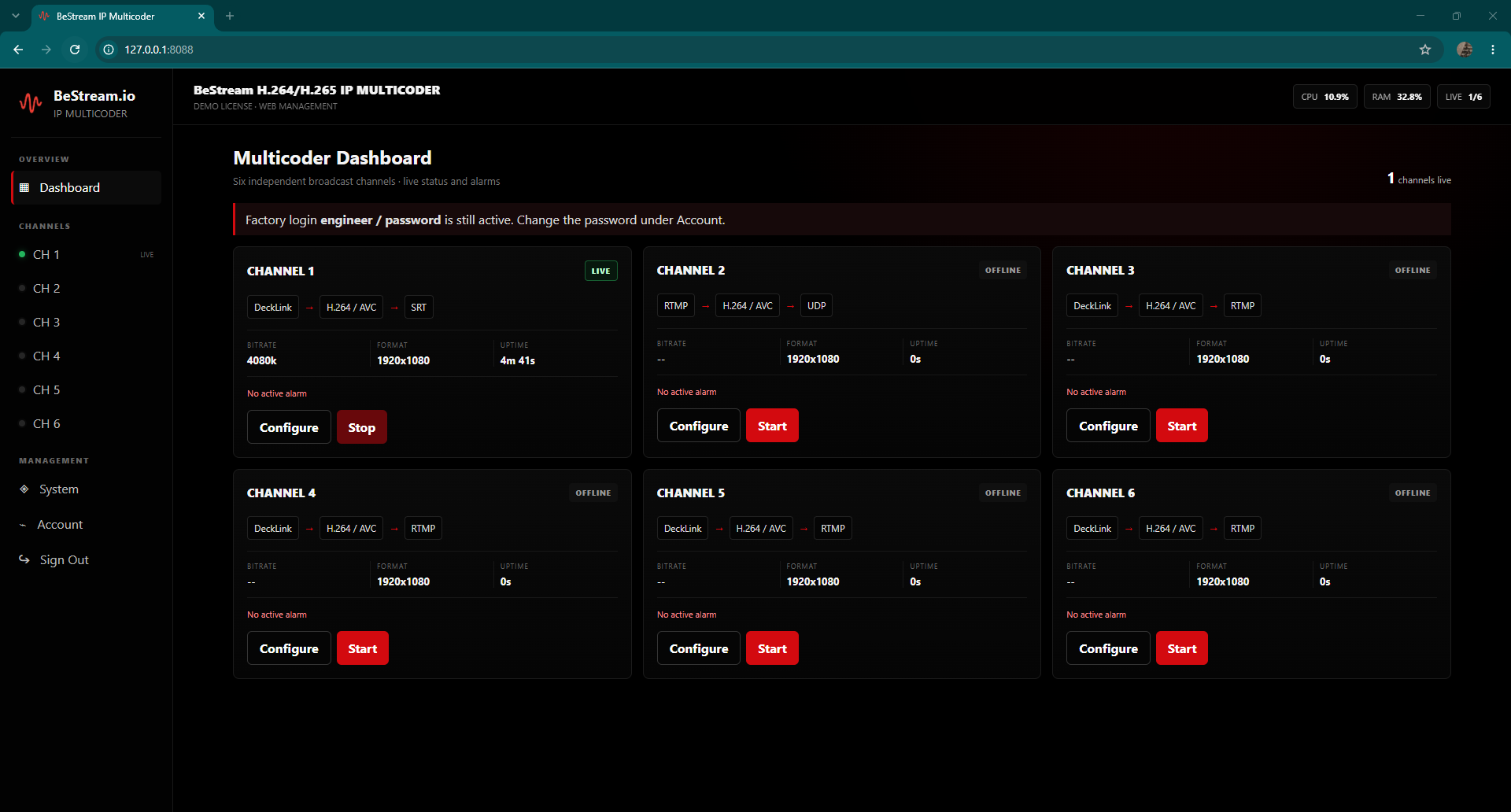
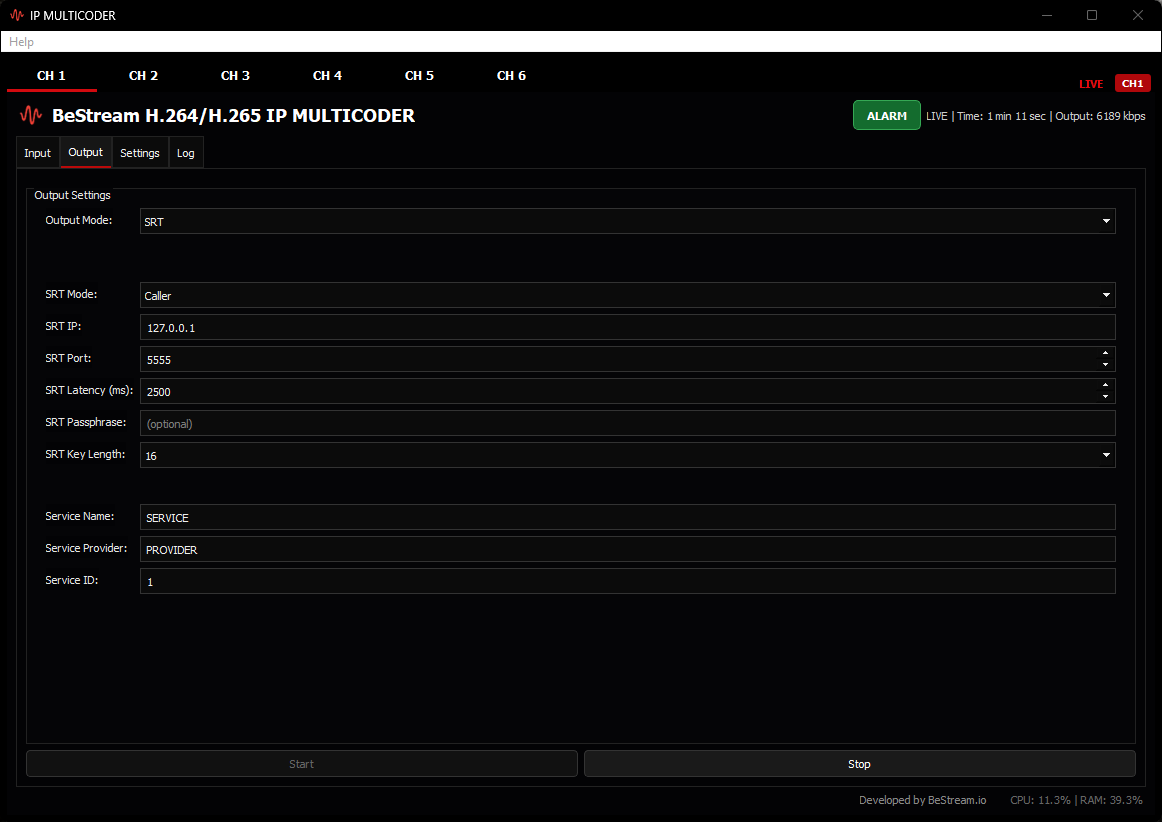
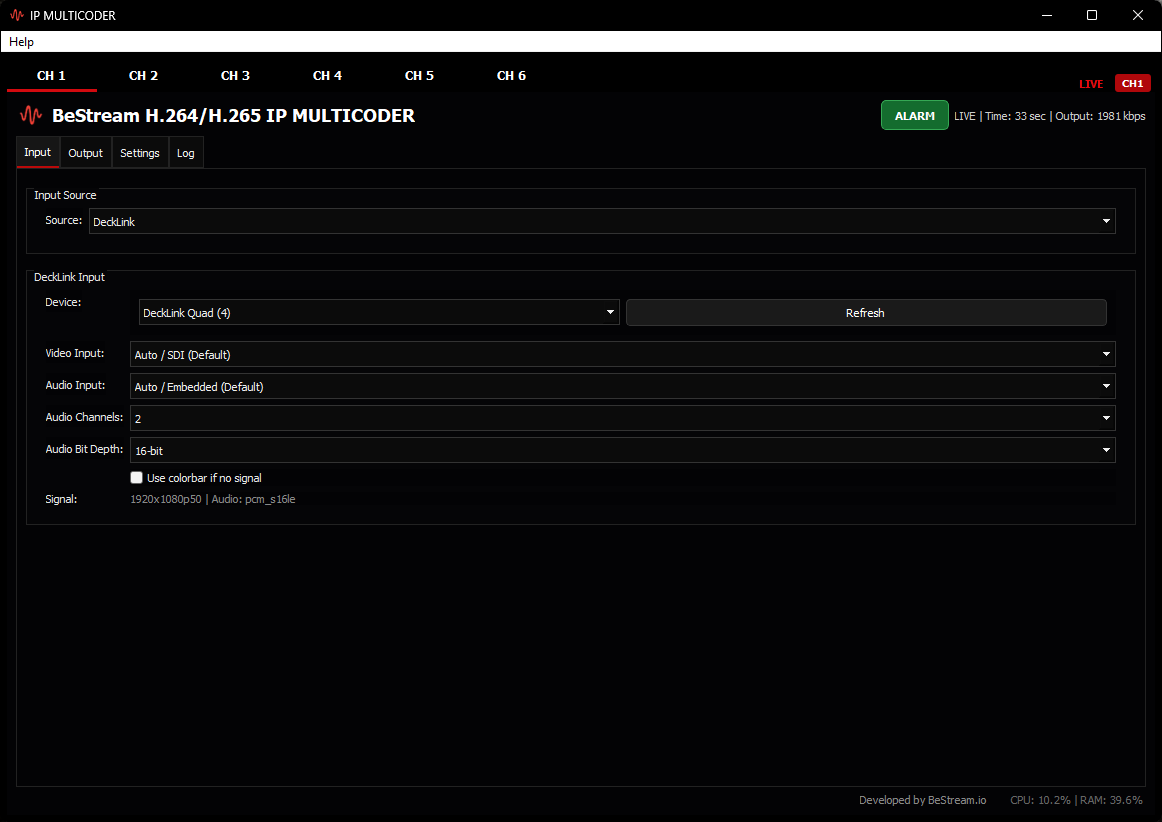
IP MULTICODER — H.264/H.265 ENCODER & SRT/UDP DECODER
IP MULTICODER combines an H.264/AVC and H.265/HEVC encoder, SRT/UDP decoder/receiver and protocol gateway in one Windows broadcast application. It supports UHD/4K contribution over SRT or UDP, H.264 RTMP primary/backup publishing and remote Web Management. Request a 15-day trial license, or see the full IP MULTICODER specifications.
Encode SDI, HDMI, analogue or Blackmagic DeckLink sources; receive and decode SRT or UDP MPEG-TS feeds; or convert SRT/UDP input to SRT, UDP and compatible H.264 RTMP output — all from the same software build.
 Encoder + Decoder + Gateway • 15-day trial • Web Management
One multi-protocol dashboard for contribution encoding, IP feed decoding, protocol conversion and remote operation.
Frequently Asked Questions
Request a Quote
Send expected BeStream-hosted viewers, channels and target countries for the best setup and pricing.


Relay Destinations
Forward your program feed from BeStream Live Event, BeStream Studio, your encoder, or a live channel to every important destination from one panel.